Ten customer schools. Read their school-approved testimonials below, published by Shikshaware.
Gyan Bharti Public SchoolRead testimonial from Gyan Bharti Public School
“Shikshaware helps our team bring student records and day-to-day administration together.”
Gyan Bharti Public School
Vikas VidyalayaRead testimonial from Vikas Vidyalaya
“Having our school workflows in one place helps our staff stay coordinated.”
Vikas Vidyalaya
St Paul Modern SchoolRead testimonial from St Paul Modern School
“Shikshaware supports the everyday administrative work of our school.”
St Paul Modern School
Sacred Heart SchoolRead testimonial from Sacred Heart School
“We value having connected information for our office and academic teams.”
Sacred Heart School
Springdales International Girls SchoolRead testimonial from Springdales International Girls School
“Shikshaware helps our team manage school records through a shared platform.”
Springdales International Girls School
Prabhat Tara English SchoolRead testimonial from Prabhat Tara English School
“Our team uses Shikshaware to organize its day-to-day school workflows.”
Prabhat Tara English School
Ambience Global SchoolRead testimonial from Ambience Global School
“Connected student records help our teams work from the same information.”
Ambience Global School
Shiksha Bharti International SchoolRead testimonial from Shiksha Bharti International School
“Shikshaware brings our administrative workflows together in one application.”
Shiksha Bharti International School
St JosephRead testimonial from St Joseph
“Our staff use Shikshaware as part of their everyday school administration.”
St Joseph
Buddha World International SchoolRead testimonial from Buddha World International School
“Shikshaware supports our school's operational and academic administration.”
Buddha World International School
SEE HOW IT WORKS
One student journey. Every team connected.
Follow one student record through admissions, fees, attendance, exams, results and certificates. Explore the real screens below or view sample school documents.
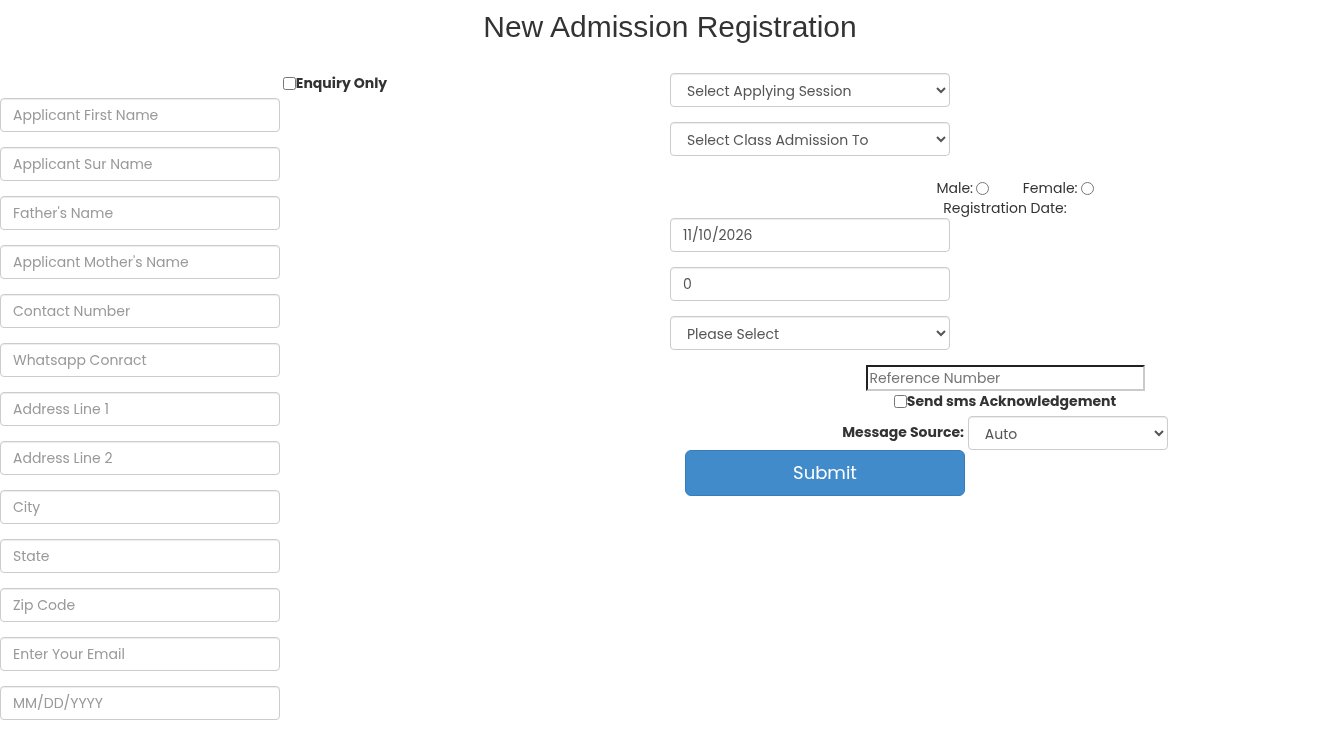
01Register and admit a student
Review the enquiry, complete registration and map the admitted student to the appropriate class and section. Check admission and roll numbers before using the record in other modules.
Find the student, review applicable charges and record a collection. Check the receipt, fee history and outstanding dues; verify any enabled online payment against its recorded status.
Record student and staff attendance, review absences and leave requests, and check the reports available to each role. Include your biometric device in the compatibility discussion.
Prepare question papers, run online tests and enter marks for the configured exam and session. Review subject limits, assessment settings and the selected report format before printing results.
Review subject marks, configured totals, percentages and grades. Inspect the performance graph and attendance summary before printing the selected report-card format.
Built for your whole school. Ready for every school day.
Give your office, teachers, accounts team and leadership the tools for their roles. Explore 17 connected workflow areas, from student records to campus services.
17 workflow areas. Expand a module to see its features.
01
Admissions & Registration
From first enquiry to enrolled student.+
Manage the complete journey – from enquiry and registration to confirmed admission and enrollment.
Student admission and roll numbers on supported slips
Receive fee (normal & detailed)
Non-monthly fee
Outstanding & dues reports
Daily & monthly fee summaries
Transport/hostel mapping
Wallet balance reports
Payment gateway integration and payment details
03
Attendance & Leave
Attendance and leave, with the right permissions.+
Centralised attendance for students and staff, with approvals and analytics.
Biometric device integration for supported devices
Student attendance add / view
Staff attendance view
Self attendance (IN/OUT)
Location / QR based options
Apply / approve leave (staff, student)
Missing attendance reports
Monthly attendance reports
04
Academics, Exams & Reports
Online tests, question papers, marks and reports.+
Academic cycles, lesson plans, schedules, marks entry and professional report cards.
Online test facility
School-specific, syllabus-specific and exam-specific question paper generation
Academic cycle planner
Lesson plan creation & status
Teacher & class schedules
Bulk marks entry & view
Subject-wise analysis
Exam result & progress reports
Admit cards & report cards
Blank marks slips and report cards
Configured marks totals, percentages and grades
Exam seating plans
AI-assisted marks import where enabled
05
Communication & Parent App
Keep families connected to school information.+
Keep parents, teachers and management in-sync with structured communication.
WhatsApp + SMS notifications
Broadcast approved messages
Notices – add & display
Event links & lectures
Vacation homework upload
Parent mobile app
Message logs & audit
06
Transport & Vehicles
External GPS integration, vehicles and transport fees.+
Manage vehicle and driver records, fuel usage, student transport mapping and related fee reports.
External GPS integration with supported providers
Vehicle & driver registry
Vehicle-wise dues
Fuel usage tracking
Transport categories and fees
Student transport mapping
07
Accounts & Audit
Expenses, income, vendors and financial reports.+
Core accounting tools tightly integrated with the fee system.
Expense & income categories
Add / display expenses
Other income records
Vendors list
Audit & accountant-wise reports
Projected monthly income
Bulk salary update
08
Certificates & ID Cards
Prepare the documents your school needs.+
Rich, configurable certificates embedded into your ERP workflow.
Custom certificate generator
Transfer certificates (TC), character and bonafide certificates
External student certificates
Authority signature upload
Student image upload to server
Configurable layouts
Student and staff ID cards
09
Automation, Session-End & Governance
Get ready for the next academic session.+
Prepare promotions, fees and configuration for the next academic session.
System configuration panel
Unplanned fee add/remove
Session end workflow
Promote students in bulk
Update dues in March
Next session fee & config
Exception lists & validations
10
Library Management
Catalogue, issue, return and overdue books.+
Manage the book catalogue, issue and return books, and review library activity and overdue items.
Book stock and search
Issue and return records
Due and overdue books
Library dashboard and QR labels
11
Gate Passes & Visitor Records
Pass approvals and recorded campus movements.+
Manage configured gate-pass approvals and record entry and exit movements. Staff remain responsible for checking identity and authorization.
Student and visitor passes
Approval workflows
QR lookup
Entry/exit records and reports
12
Hostel & Day-Boarding Fees
Configured categories, charges and dues.+
Map students to configured hostel or day-boarding categories and review the applicable collections and outstanding amounts.
Student category mapping
Hostel fee collection
Configured day-boarding charges
Related dues reports
13
Staff & Salary Records
Staff profiles, salary updates and slips.+
Maintain staff profiles and salary-related records alongside attendance, leave and account workflows.
Staff profiles and ID cards
Staff attendance and leave
Bulk salary updates
Salary slips and related records
14
Tasks & Teaching Coordination
Coordinate teaching tasks and schedules.+
Assign and review staff tasks, lesson plans and schedules through the roles enabled for your school.
Teacher tasks and progress
Principal review
Lesson plan status
Teacher and class schedules
15
Organizations & Branches
Supported workflows for organization owners.+
Let authorized organization owners add and manage their branches through the supported organization workflow.
Organization ownership
Branch registration
Organization-linked accounts
Role-controlled branch administration
16
User Access & Password Administration
Authorized account and password management.+
Manage supported student and staff account actions through authorized roles and the existing password-management workflow.
Role-based access
User selection and preview
Password reset workflow
Account administration
17
Stock & Medical Inventory
School stock and enabled medical inventory.+
Maintain stock and user inventory records. Where the medical-stock module is enabled, manage medicine stock, expiry details and related receipts.
Stock additions and updates
User inventory details
Medical stock and expiry dates
Inventory receipts
No matching modules.
Build the setup your school needs. We’ll confirm the right modules, integrations and permissions in your proposal.
ROOM TO GROW
A plan for your school. A clear path to getting started.
Tell us how your school works. We’ll help you compare the three plans and define the modules, setup and support you need.
Compare the starting points for your plan discussion
Plan
Discussion focus
Next step
Basic
Everyday administration: admissions, student records, fees and attendance.
Advance
Academic and team coordination: teaching tasks, accounts, transport and communication.
Ultimate
Wider operational requirements: configuration, session-end tools, roles and organizations.
Your written proposal confirms the included modules, permissions, setup, training, integrations and charges.
LET’S PUT YOUR SCHOOL IN THE PICTURE
See your school. Working together.
Show us your admission process, fee structure or exam format. We’ll walk you through how Shikshaware can support your school’s day-to-day work.
Your demo: what happens next?
Your requirements and demo. Choose the workflows you want to see. We’ll review your needs and arrange a school-specific walkthrough.
Your written proposal. Confirm modules, integrations, setup, training and charges before deciding.
Your agreed setup. Plan data preparation, configuration and training around the scope you choose.
Prepare for your walkthrough
Bring a blank fee format or report-card layout, your class and section structure, and the workflows your team wants to see. Use fictional student details in the demonstration.
What your quotation covers
We confirm your chosen modules, user roles, integrations, data setup, training, recurring charges and any one-time costs in writing. The agreed scope determines the rollout plan.
Check your integration fit
Existing payment connectors: Razorpay, PhonePe, ICICI Eazypay and HDFC SmartGateway. Activation requires merchant setup and payment verification tests.
Compatibility review: biometric and GPS models, tracking platforms and other gateways. Share the exact model and connection method.
GPS: share the provider and device or platform details.
Payments: share your gateway and the payment workflow you need.
Biometrics: share the device brand, model and connection method.
Our team will confirm compatibility, setup requirements and any additional charges. Provider and device support depends on the integration. Browse the device and provider directory.
Shikshaware is school and college management software published by Shikshaware Private Limited. It supports the school journey from admission to transfer certificates (TC), including student records, fees, attendance, online tests, question paper generation, examinations and campus administration. External GPS, payment gateway and biometric device integrations are available with compatible providers and devices.
Which school management modules does Shikshaware include?
+
Shikshaware includes admissions, student and staff records, fees and payments, attendance and leave, teaching schedules and tasks, exams and report cards, parent communication, transport, hostel and day-boarding fees, library, stock, accounts and audit, salary records, certificates and ID cards, gate passes and visitor records, organization branches, user access and session-end administration. Online tests and school-specific, syllabus-specific and exam-specific question paper generation are also available. External GPS, payment gateway and biometric device integrations depend on compatible providers, devices and configuration. Medical stock and AI-assisted marks import are available where enabled. Confirm module availability, integrations and permissions for your selected plan in a demonstration.
Can Shikshaware manage school fees and online payments?
+
Shikshaware provides fee collection, receipts, student fee history, outstanding dues and collection reports. Online payment workflows depend on the school's configured payment gateway. Ask the team to demonstrate payment verification and outstanding balances using your fee structure.
Does Shikshaware support online tests, question papers and report cards?
+
Yes. Shikshaware provides an online test facility and question paper generation tailored to a school's syllabus and specific exam. It also includes configured CBSE assessment columns, marks entry and applicable report-card formats. Review the syllabus, exam requirements, assessment rules and selected format in a demonstration.
How much does Shikshaware school ERP cost?
+
Review the plan information on this website, then request a written quote for your student and campus scope, required modules, setup, training and applicable integrations. Confirm recurring and usage-related charges with the team rather than assuming one price fits every school.
How can I request a school ERP demonstration?
+
Use the contact section on the official Shikshaware website or email support@shikshaware.com. Share your class and section structure, fee process, attendance needs and examination format so the demonstration can follow your school's actual workflow.
Scroll horizontally to inspect the full-size screen, or fit it to the window.
Register your institution
Institute Registration
Request a demo or quotation
Ready to create an account?
Terms & Conditions, Privacy & Refund Policy
Agreement between Client and Shikshaware Private Limited
These Terms and Conditions (the “Agreement” or “Terms and Conditions”) are an agreement between you and Shikshaware Private Limited under the provisions of Companies Act,2013 having registered office at Patahi, Chhourahi ,Near Peepal Tree ,Begusarai (Bihar)—848202, ("Shikshaware Private Limited") concerning the terms under which Shikshaware Private Limited offers you the software and services contained in or available through Shikshaware.com (collectively the “Service” or “Shikshware.com”). Its services are offered to you conditioned on your acceptance of the terms, conditions, and notices contained in this electronic document. If you do not agree with these terms and conditions, do not use our software
“Using” our software , means doing all school actions like taking attandence, managing fees, displaying results, registering students and teachers, assigning tasks etc... constitutes your agreement to all the terms, conditions, and notices contained in this electronic document.
Shikshaware Private Limited is not responsible for any data loss initiated by you, it means if you delete the data intentionally, we are not responsible for that. How ever on request we can make the lost data available for you
Privacy Policy
With effect from June,3th 2022
Protecting your private information is our priority. This Statement of Privacy applies to the shikshaware.com website and governs data collection and usage. By using our software, you consent to the data practices described in this statement.
Collection of your Personal Information
Shikshaware.com may collect personally identifiable information, such as your e-mail address, name, home or work address or telephone number. If you purchase Shikshaware software and services, we collect and store billing and credit card information for processing online payments. Shikshaware may also collect anonymous demographic information, which is not unique to you, such as your Postal Code, age, gender, preferences, interests and favorites. Shikshaware Private Limited will not delete customer information for paying members. However, Shikshaware Private Limited reserves the right to delete customer information for members with a free account status at any time
Information about your computer hardware and software also may be automatically collected by Shikshaware.com. This information can include: your IP address, browser type, domain names, access times and referring website addresses. This information is used by Shikshaware for the operation of the service, to maintain quality of the service, and to provide general statistics regarding use of the Shikshaware.com website.
Use of your Personal Information
Shikshaware collects and uses your personal information to operate the Shikshaware.com website and deliver the services you have requested. Shikshaware will send one welcome email following registration to all registered patrons. We will also periodically send service updates to registered users.
If you are using our support services, will be supplying your personal information to government services and such information may be available in public domain. It is possible that such personal information may be used by some person for marketing and in that case, Shikshaware is not responsible. Shikshaware does not sell, rent or lease its customer lists to third parties. Shikshaware may, from time to time, contact you on behalf of external business partners about a particular offering that may be of interest to you. In those cases, your unique personally identifiable information (e-mail, name, address, telephone number) is not transferred to the third party without your explicit consent. In addition, Shikshaware may share data with trusted partners to help us perform statistical analysis, send you email or postal mail, provide customer support, or arrange for deliveries. Shikshaware may share your information with third parties who perform tasks required to complete a purchase transaction. All such third parties are prohibited from using your personal information except to provide these services to Companiesinn.com, and they are required to maintain the confidentiality of your information.
Use of Cookies
The Shikshaware.com website may use "cookies" to help you personalize your online experience. A cookie is a text file that is placed on your hard disk by a web page server. Cookies cannot be used to run programs or deliver viruses to your computer. Cookies are uniquely assigned to you, and can only be read by a web server in the domain that issued the cookie to you.
One of the primary purposes of cookies is to provide a convenience feature to save you time. The purpose of a cookie is to tell the Web server that you have returned to a specific page. For example, if you personalize Shikshaware.com pages, or register with Shikshaware.com site or services, a cookie helps Shikshaware.com to recall your specific information on subsequent visits. This simplifies the process of recording your personal information, such as billing addresses, shipping addresses, and so on. When you return to the same Shikshaware.com website, the information you previously provided can be retrieved, so you can easily use the Shikshaware.com features that you customized.
You have the ability to accept or decline cookies. Most Web browsers automatically accept cookies, but you can usually modify your browser setting to decline cookies if you prefer. If you choose to decline cookies, you may not be able to fully experience the interactive features of the Shikshaware services or websites you visit.
Security of your Personal Information
You are responsible for safeguarding and preventing unauthorized access to the user information and password that you use to access the Shikshaware.com website. You agree not to disclose your password to any third party and you are responsible for any activity using your account, whether or not you authorized that activity. You must immediately notify Shikshaware Private Limited of any unauthorized use of your account.
Changes to this Statement
Shikshaware will occasionally update this Statement of Privacy to reflect company and customer feedback. Shikshaware encourages you to periodically review this Statement to be informed of how Shikshaware is protecting your information.
Refund Policy
The Fee that you pay to Shikshaware Private Limited for using the software will be a retained by Shikshaware and if you want to stop using our product and want refund,we will calculate the amount need to refund and will refund the amount within 7 business day
Limited Liability
Under any circumstances, the maximum liability of Shikshaware shall be limited to the fee we collected for the services and we will not liable for any loss or damages that may be incurred or as may be claimed by the customer due to delay in process (technical or otherwise) or rejection of application by the regulatory authorities.
Procedure for Requesting Refund
In case you want to cancel the subscription or request refund of fee, contact your relationship manager or sent an email to support@shikshaware.com with reason for refund of fee.
Cancellation Fee
We will be incurring cost and manhours, technology resources and technical and professional expertise of professionals and technical resources throughout the process such as client briefing, meetings with professionals and experts, use of technology resources, documentation and guidance, processing and co-ordination with external service providers, compliance documents preparation filing with regulatory platforms, liaison with regulatory authorities etc. So, we reserve the right to charge a cancellation fee for every refund request as we are required to incur time and cost from the stage of customer enquiry through the service delivery process. A cancellation fee of 10% of the order value subject to minimum of Rs.200/- will be charged for every refund request.
Jurisdiction
Any disputes or claims and refund of fee arising in connection with serices engagements with Shikshaware shall be governed in accordance with the law of India and courts in Begusarai shall have the exclusive jurisdiction to settle the matters.
For any clarification, please contact your relationship manager or mail to support@shikshaware.com
For any clarification, please contact your relationship manager or write to
support@shikshaware.com.
 Shikshaware.Students, staff and records. Connected.